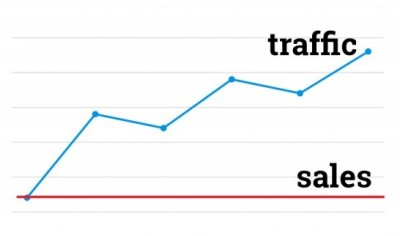
Getting traffic to your Shopify store is a great first step—but if visitors aren’t converting into customers, something in your funnel is broken. This is one of the most common challenges in e-commerce: high traffic, low sales. The good news? It’s almost always fixable once you identify the weak points.
Let’s break down the real reasons why this happens—and how to turn clicks into customers.
1. Your Traffic Isn’t the Right Audience
Not all traffic is good traffic. If you’re attracting visitors who aren’t actually interested in buying your product, conversions will stay low no matter how polished your store is.
For example, viral TikTok content or broad Facebook ads can bring in large numbers of people—but if they’re not your target customers, they’ll bounce quickly.
What to do:
- Refine your targeting (age, interests, location)
- Use intent-based keywords in ads (e.g., “buy,” “best,” “affordable”)
- Focus on platforms where your buyers actually shop
2. Your Product Page Doesn’t Build Trust
A visitor decides in seconds whether they trust your store. If your product page feels incomplete or unprofessional, they won’t buy.
Common issues include:
- Low-quality images
- Generic descriptions
- No customer reviews
- Missing shipping/return info
What to do:
- Use high-resolution product images (lifestyle + close-ups)
- Write benefit-driven descriptions (not just features)
- Add reviews and testimonials
- Clearly state shipping times and return policies
3. Pricing Feels Wrong (Too High or Too Suspiciously Low)
Pricing plays a psychological role. If your product is too expensive without justification—or too cheap to seem credible—people hesitate.
What to do:
- Compare competitors in the U.S. market
- Use anchoring (e.g., “Was $49.99, now $29.99”)
- Highlight value (bundles, guarantees, free shipping)
4. Your Store Lacks Social Proof
People trust other buyers more than brands. If your store has no reviews, no user-generated content, and no visible activity, it feels risky.
What to do:
- Add real customer reviews (with photos if possible)
- Show recent purchases (“Someone in Texas just bought…”)
- Include testimonials or influencer mentions
5. Slow Website or Poor Mobile Experience
Most U.S. e-commerce traffic is mobile. If your store loads slowly or looks bad on phones, users will leave immediately.
What to do:
- Optimize images and remove unnecessary apps
- Test your store on different devices
- Keep design clean and fast-loading
6. Confusing Checkout Process
Even if someone wants to buy, friction during checkout can kill the sale.
Common problems:
- Too many steps
- Unexpected shipping costs
- Limited payment options
What to do:
- Enable guest checkout
- Show total cost upfront
- Offer popular U.S. payment methods (Shop Pay, PayPal, Apple Pay)
7. Weak Call-to-Action (CTA)
If your “Add to Cart” or “Buy Now” button isn’t clear and compelling, users won’t take action.
What to do:
- Use strong CTAs like “Buy Now” or “Get Yours Today”
- Make buttons large and visible
- Add urgency (e.g., “Limited stock available”)
8. No Urgency or Reason to Buy Now
If customers feel they can come back later, many never will.
What to do:
- Add limited-time offers
- Use countdown timers (carefully, don’t overdo it)
- Highlight scarcity (“Only 5 left in stock”)
9. Mismatch Between Ads and Landing Page
If your ad promises one thing but your product page shows something different, users lose trust instantly.
What to do:
- Keep messaging consistent from ad → product page
- Use the same images and tone
- Deliver exactly what you advertised
10. You Haven’t Tested Enough
Conversion optimization is not guesswork—it’s testing. Many store owners change things randomly instead of using data.
What to do:
- Run A/B tests on product pages
- Track behavior with tools like heatmaps
- Analyze where users drop off
Final Thoughts
Traffic without sales is frustrating, but it’s actually a good sign—you already have attention. Now it’s about improving conversion.
Focus on:
- Better targeting
- Stronger product pages
- Faster experience
- More trust signals
Small improvements in each area can dramatically increase your revenue without increasing ad spend.
FAQ
Q: What is a good conversion rate for a Shopify store?
A: In the U.S., a typical Shopify conversion rate ranges from 1.5% to 3%. Anything above that is considered strong.
Q: Why do people add to cart but not buy?
A: Usually due to unexpected costs, slow checkout, or lack of trust (e.g., no reviews or unclear policies).
Q: Should I focus on more traffic or better conversions?
A: Improve conversions first. More traffic won’t help if your store isn’t converting.
Q: How long does it take to fix low conversions?
A: You can see improvements within days if you fix major issues, but full optimization is an ongoing process.
